Large Print Grocery List: Free Printable Shopping List
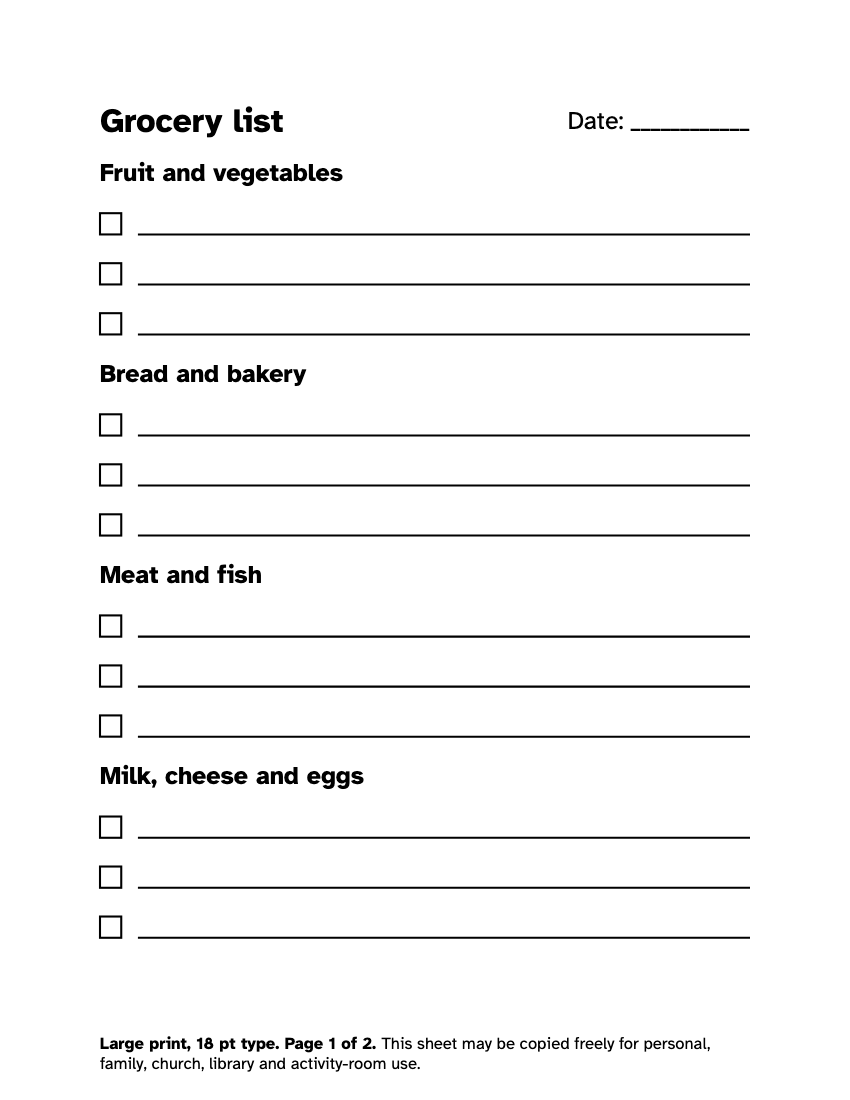
This free large print grocery list has bold headings and wide blank lines to write on. Change the title and the headings, choose 2 to 6 lines under each, pick 18, 24 or 28 point, and print. Nothing you type is sent anywhere.
| Headings | Eight by default, edit them to suit you |
|---|---|
| Blank lines | 2 to 6 under each heading |
| Title | Rename the list, for example Weekly shop |
| Type size | 18, 24 or 28 pt |
| Paper | US Letter, A4 or 11 x 17 in |
How do I print a large print grocery list?
Set the title, the number of blank lines under each heading and the type size, then press download. The PDF prints one page in portrait, with a date line at the top and each heading in bold above its lines.
Print a stack at the start of the month and keep them by the coffee maker or the fridge. Each week take one down and write in it. Use a dark, wide pen. A thick felt-tip pen makes a darker, wider line than a ballpoint, which many people with low vision find easier to see.
The page follows the guidance of the American Printing House for the Blind (APH): 18 point or larger, plain type, single column, solid black rules, no gray. You will find the reasons in what is large print.
How should I group a grocery list?
Group by the parts of the shop, in the order you walk through it. It saves backtracking and lets you cross off a whole section at a time. The default headings on the page are:
| Heading | For |
|---|---|
| Fruit and vegetables | Fresh produce |
| Bread and bakery | Loaves, rolls, cakes |
| Meat and fish | Fresh and packaged |
| Milk, cheese and eggs | Chilled dairy |
| Tins, jars and packets | Cupboard items |
| Frozen food | Freezer aisle |
| Household | Cleaning, paper goods, toiletries |
| Other | Anything else |
Every shop is laid out differently, so rearrange the headings to match yours. Put the section you visit first at the top, and finish with frozen food so it stays cold on the way home.
How can I make a shopping list easier to read in the shop?
Write short. One or two words a line, with the amount beside it: "Milk 2", "Apples 6". Big printing on a short line is easier to find than small writing on a full one.
Carry the list on a clipboard, or in a plastic sleeve that keeps it flat. Cross out each item with a single bold line as you put it in the cart. Use a fresh list each trip so the page is never crowded.
If shopping is a task for a helper or a family member, print two copies, so one stays in the kitchen and the other goes with the shopper. Share the list ahead of time by phone or note, and read it out if needed.
For a bigger job, such as shopping for a group at a care home, choose 11 x 17 inch paper and 24 point, so it can be read from a distance while several people call out items. If you also keep track of what you spend, the large print check register lays out payments and balances with the same tall rows, and the wider large print money forms page gathers the rest. Other everyday sheets, such as the large print to do list and the large print phone book, are gathered under large print lists.
Can I change the headings on the list?
Yes. Type one heading per line in the headings box, and the list follows. You could make it a list of medicines to pick up, a list of jobs for the week, or the things to pack for a stay in hospital. Choose two to six blank lines under each heading, depending on how much you write.
The title is limited to 40 characters and the list to 24 headings, so everything stays large on the page. Your text stays in your browser, and nothing is stored. When you have made a list you like, print several copies. For planning further ahead, the large print calendar for 2027 has a page for every month. To turn any other text into a big print sheet, use the large print maker.